See everything Salva AI can do
For dentists who want to know exactly what they’re getting — and office managers who want to understand every control. Every feature, every setting, all in one place.
Real-time intelligence.
No guesswork.
Your dashboard shows exactly how your AI is performing — at a glance, the moment you log in.
- Inbox notifications— Emergencies, bookings, and callbacks in one place
- Emergency detection— Flags urgent cases for immediate team attention
- After-hours handling— Captures inquiries when your office is closed
- Total interactions— Every chat and call, tracked automatically
- Appointments booked— See how many patients converted to bookings
- Phone calls handled— Total voice calls answered by your AI
Robert Wilson
Severe Pain • 10 mins ago
Sarah Miller
New Patient Exam • Tue 2:00 PM
Emily Davis
Asking about whitening options
2m ago
James Torres
Wants same-day emergency slot
14m ago
5m ago
22m ago
1h ago
What changes on a Tuesday.
Two perspectives. Same practice. The difference between drowning in calls and running the day.
The Office Manager
Front desk, scheduling, insurance verification
Without Salva
- 7:45 a.m.Walk in to 12 voicemails. Spend the first hour returning calls back-to-back.
- 8:30 a.m.Phone rings constantly while you're trying to set up the day's first patient. Two callers give up and hang up.
- 10:15 a.m.Miss a same-day reschedule because both lines were busy. Slot stays empty all afternoon.
- 12:30 p.m.Eat lunch at your desk between three insurance verification calls.
- 6:00 p.m.After-hours callers go to voicemail. You'll deal with them in the morning.
With Salva
- 7:45 a.m.Walk in to a clean Inbox: 3 bookings already in Open Dental, 2 callbacks queued with reason notes, 0 missed calls.
- 8:30 a.m.Setup the room. Phone doesn't ring once — Salva handles overflow.
- 10:15 a.m.Same-day reschedule? Salva already offered the patient your 2 p.m. slot and booked it.
- 12:30 p.m.Take an actual lunch break. Insurance questions are getting answered by Salva from your accepted-carriers list.
- 6:00 p.m.Salva keeps answering after-hours calls. Emergency? You get an SMS. Booking? It's waiting in the Inbox tomorrow.
The Dentist
Chair-time, clinical focus, emergencies
Without Salva
- 8:00 a.m.Get pulled out of an op for a pricing question. Lose 5 minutes of clinical flow.
- 10:30 a.m.Front desk pages you to confirm an emergency slot. You step out mid-exam.
- 1:15 p.m.Manager interrupts to ask about an insurance carrier — answer is the same as last week.
- 4:00 p.m.Phone tag with three patients about treatment plans.
- 7:00 p.m.Get a text at home asking about an after-hours emergency. Have to call back personally.
With Salva
- 8:00 a.m.Op stays an op. Pricing questions handled by Salva using your published ranges.
- 10:30 a.m.Emergency gets routed to your dedicated emergency line. You see the alert between patients, not mid-exam.
- 1:15 p.m.Insurance questions answered from your accepted-carriers list. Zero interruptions.
- 4:00 p.m.Treatment-plan questions queue as callbacks for billing — you focus on chair-time.
- 7:00 p.m.After-hours emergencies still hit your SMS — but only the real ones. Non-urgent stuff queues to morning.
7 AI behaviors. All toggleable.
Click any feature to see exactly how it changes your AI’s responses — in real time.
Feature: Instant Booking
Toggle the feature above to see the response change
Configure everything.
No developer needed.
Every detail of your AI — from its name and personality to its voice tone — is configurable from your dashboard.
Settings
Not mockups. The actual screens.
This is the real Settings area you'll use — the same controls shown throughout this page.
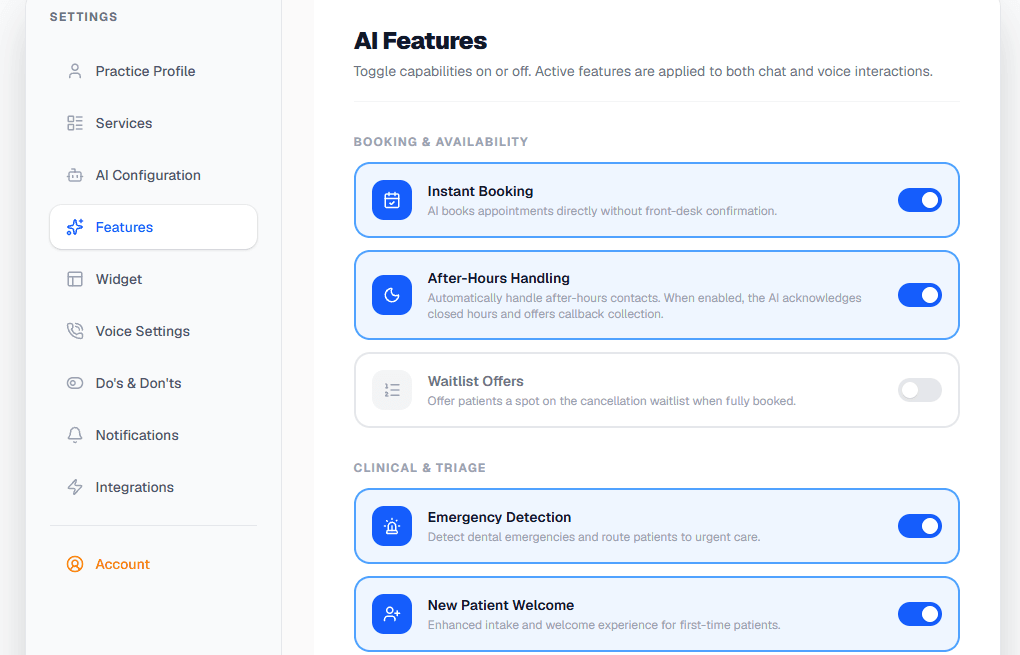
Turn instant booking, after-hours handling, emergency detection, and more on or off — per practice.
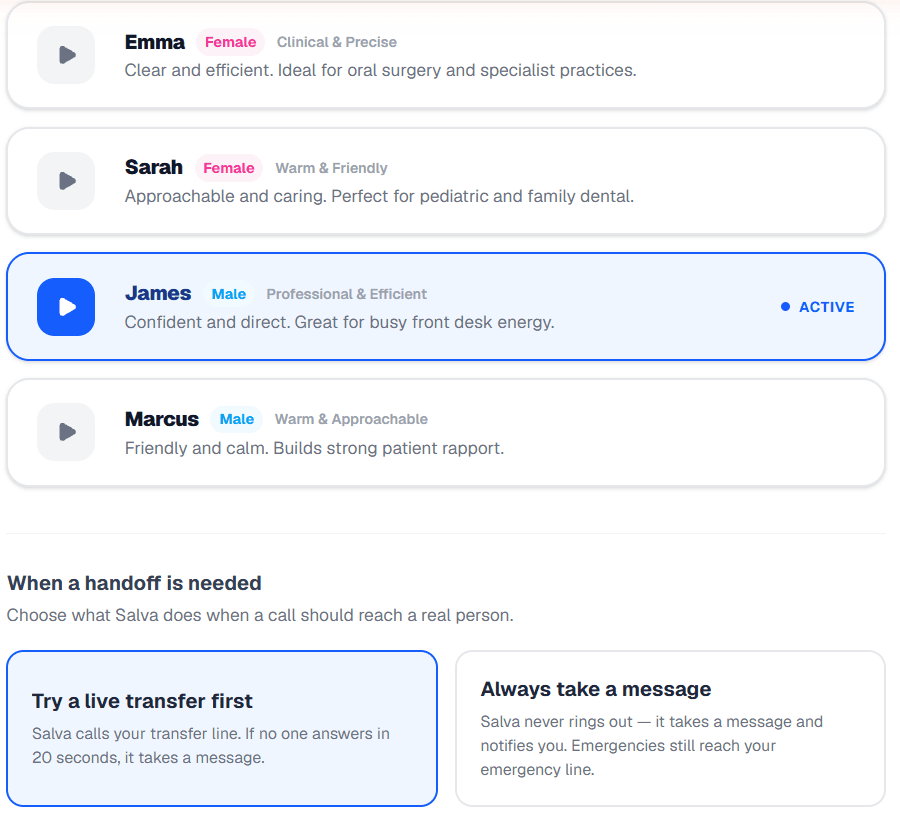
Pick your AI's voice, then choose exactly what happens when a call should reach a real person.
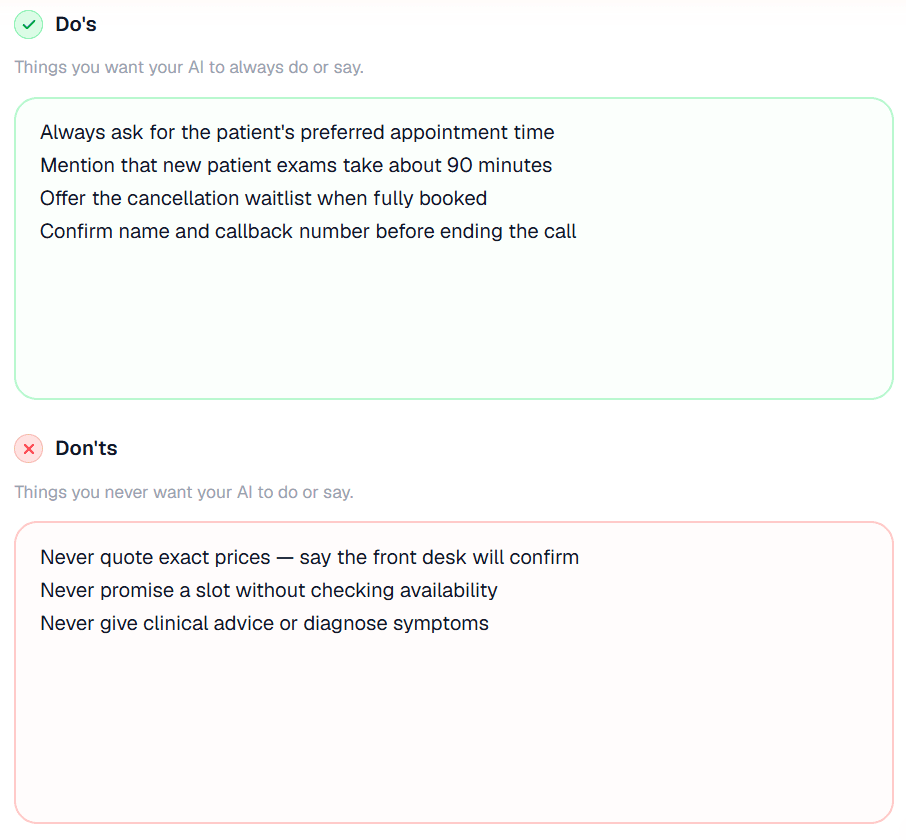
Do's & Don'ts written in plain English, applied to every call and chat.
Actual product screenshots — shown with sample data.
Never miss an emergency
or booking request.
Your inbox surfaces the conversations that need human attention — emergencies, pending bookings, and callback requests — all in one place.
Action Required
2 NEWReview and resolve incoming requests
Alert Channels
Configure how you receive notifications for emergencies, bookings, and callbacks.
Your inbox updates instantly as conversations arrive. Never miss an emergency, booking request, or callback.
AI that follows
YOUR rules.
Write plain English rules — one per line. Your AI follows them on every call and chat, no matter what.
Always do
- Always ask for the patient's preferred appointment time
- Mention that new patient exams take approximately 90 minutes
- Offer the cancellation waitlist when fully booked
- Confirm the patient's name and contact number before ending the call
Never do
- Never quote exact prices — always say 'call for pricing'
- Never promise a specific appointment slot without confirming availability
- Never diagnose symptoms or provide clinical advice
- Never share other patients' information
Answers every call.
Even at 2 a.m.
Choose your voice operator. Select one below to hear how they sound on a sample call.
Under the hood
This isn't a script reader. Salva handles barge-in — interrupt it mid-sentence and it stops, confirmed against the actual transcript so a real interruption doesn't get treated the same as a stray "mhm." It parses how people actually talk: spelled-out names, phone numbers said as "double four," dates like "the fifth of June, ninety-five." That's the difference between sounding like a phone tree and sounding like your best team member — and it's the same reason the sample calls above sound the way they do.
It's also the same brain on your website. The chat widget runs the identical booking logic as the phone line — literally the same code, checked automatically so the two channels can't drift apart — so a patient gets the same answer whether they call or type.
Keep your number. No porting.
Salva works through call forwarding. You keep your published number. We provide a backup. You can pause us at any time.
Keep your existing number
Forward unanswered, after-hours, or all calls to your Salva line using your carrier's call-forwarding sequence (typically *72).
Backup line included
Every voice plan ships with a dedicated U.S. virtual number. Use it for testing, share it with patients, or publish it as your main line.
Pause Salva any time
One toggle in Settings → Voice. Calls go back to your normal flow instantly. No carrier changes required to pause or resume.
What happens on a real call
During business hours
- • Forwarded calls hit Salva first — your office line doesn't ring
- • Salva answers, handles the request, books or routes the call
- • On Pro / Growth: caller can ask "transfer me" → live
<Dial>to your main office - • Before the caller connects, your team hears a private whisper — caller name, number, and reason — so whoever picks up already knows who they're talking to
- • 20-second dial timeout → Salva falls back to message-taking
After hours & weekends
- • Same flow — Salva answers every call
- • Salva follows your after-hours rules: book, take messages, or escalate
- • Urgency keywords (pain, swelling, trauma) → immediate SMS + email alert to your emergency line
- • Non-urgent bookings queue to your Inbox — no 2 a.m. wake-ups
Your team focuses on chair-time. Outbound calls from your office still work normally. See the carrier setup guide for your provider's exact forwarding sequence.
What happens when Salva doesn't know.
Salva is built to defer, not guess. The AI never diagnoses, never quotes treatment plans, and never confirms benefits. Here's exactly how it handles the edge cases.
Clinical questions
"Will this tooth need a root canal?"
"That's something Dr. Chen will need to evaluate in person. I'll have someone call you back today — what's the best number?"
Treatment-plan pricing
"How much for an implant?"
"Pricing varies by your specific case. Our team can give you an accurate quote after a quick exam — would you like to book one?"
Insurance benefits
"What will my plan cover for a crown?"
"Specific coverage varies by your plan. Our billing team can verify directly with your carrier and call you back today."
Emergencies
Keywords: severe pain, swelling, trauma, bleeding
Salva captures contact info, expresses empathy, and immediately fires SMS + email alert to your configured emergency line.
Mid-call confusion
Patient mumbles, accent the AI can't parse, etc.
Salva asks once for clarification. If still unclear, offers a human transfer (Pro / Growth) or schedules a callback.
Off-topic / non-dental
Marketing calls, wrong number, spam
Politely ends the call. Logs it in the dashboard so you can spot recurring spam patterns without interrupting your team.
You can customize every guardrail in Settings → Do's & Don'ts using plain-English rules.
The emergency path, in detail
Emergency detection isn't one keyword list — it's a regex pre-check that runs on every single turn of every call, backed by an LLM recall layer that catches phrasing the pre-check misses (verb-first, possessive, "my tooth fell out" mid-sentence). It fires at any stage of a call, including mid-booking. And if no one on your team is reachable, Salva doesn't just apologize — it's guaranteed to speak a 911 / ER directive out loud before the call ends. For a practice owner, that's not a feature bullet — it's the liability story that matters most.
A chat widget that looks like yours.
Customize every detail — colors, logo, greeting, and more. Embed it on your website in one line of code.
This isn't a lead-capture form. The chat widget runs the same booking engine as the phone line — it checks live Open Dental availability and writes the appointment for real, right from the conversation. Not on Open Dental? Bookings route to your Inbox instead, same as voice.
Colors
Branding
Claire from Bright Smiles Dental
Powered by SalvaAI
Embed snippet
<script src="https://getsalvaai.com/api/widget/embed?id=biz_abc123"></script>Works with your
existing software.
Plugs directly into Open Dental, and routes cleanly into Dentrix, Eaglesoft, or paper schedules — no double entry, no surprises.
Open Dental — in detail
What the AI reads, writes, and never touches.
What it reads
- • Appointment slots and provider schedules
- • Operatory availability in real time
- • Patient records (for verified callers)
- • Appointment types and durations you configure
What it writes
- • New patient bookings into the live schedule (when Instant Booking is on)
- • Booking requests routed to your Inbox for confirmation
- • Callback requests with reason notes
- • Reads availability live before offering a slot — no stale calendar offers
What it never does
- • Never modifies existing appointments
- • Never deletes records of any kind
- • Never reads financial / billing tables
- • Never quotes treatment-plan pricing
How to connect
- 1. Enable the OpenDental eConnector on your office server
- 2. Paste your customer key + developer key in Settings → Integrations
- 3. Run "Test Sync" — Salva confirms availability fetch works
- 4. Step-by-step setup guide ships with onboarding
No double-bookings: Salva re-checks the exact slot is still open the instant before writing the appointment, and voice/chat both use an atomic claim so two callers can't land on the same opening.
Not on Open Dental?
Dentrix, Eaglesoft, Curve, Carestream, paper — Salva still works.
You don't need a PMS integration to use Salva. The voice AI and chat widget capture the same booking details on every call — patient name, contact, requested time, reason for visit — and route them to your Inbox. Your team then enters the appointment in your usual flow.
Salva captures the booking
On call or chat. Patient name, phone, requested time, and reason for visit — all logged on the conversation.
Booking lands in your Inbox
Under the Pending Bookings tab. Optional SMS + email alert to your team when notifications are enabled.
Your team confirms in your PMS
Office manager enters the appointment in Dentrix, Eaglesoft, Curve, or your paper book, then taps Resolve to archive the conversation.
Same voice AI, same chat widget, same dashboard, same alerts. The only difference: your team writes the appointment into your PMS instead of Salva doing it directly.
Direct integrations on the roadmap
Use Salva today with the manual-route flow above. Direct integration arrives when ready — no platform change required when it does.
The first five minutes.
Honest, no-fluff breakdown of every step from sign-up to your first live test call.
Pick a plan and sign up
~30sClick Start Free Trial. Enter email + password. Pick Basic, Pro, or Growth. 14-day trial — your card is saved at checkout but not charged until the trial ends. Cancel in one click.
Tell us about your practice
~90sPractice name, hours, services with durations, accepted insurance, AI's name, voice operator, and tone. Each field has a sensible default — accept them or customize.
Connect Open Dental (or skip)
~30sPaste your Open Dental API key and developer key — Salva can read your live schedule. Not on Open Dental? Skip this step. Bookings will route to your Inbox.
Forward your phone
~30sCopy your carrier's call-forward sequence from /setup (typically *72 + your Salva number). Dial it once from your office phone.
Test it
~60sCall your office number from your cell. Salva picks up. Ask it a question, book a fake appointment, hang up. Watch it show up in your dashboard Inbox in real time.
Built for the data your practice handles.
Salva runs on a HIPAA-aligned architecture from day one. Every layer is designed so patient data stays where it belongs.
HIPAA-aligned architecture
Designed from the ground up to handle patient information safely, using vetted subprocessors with BAAs available for eligible plans.
BAA available
Business Associate Agreement available on Pro and Growth plans. Standard turnaround under 2 business days.
AES-256-GCM field encryption
Sensitive fields — OpenDental API keys, patient names, phone numbers, email, date of birth, and call summaries — are encrypted at the column level using AES-256-GCM, not just at rest.
U.S.-only data residency
Database, voice infrastructure, and AI providers all hosted on U.S. endpoints. No data crosses borders.
Row-Level Security
Supabase RLS ensures each practice can only ever read or write its own data — enforced at the database layer, not in app code.
Audit log
Every AI action, booking, transfer, and escalation is logged with timestamp + actor, so there's always a record of what the AI did and when.
Signed Twilio webhooks
All voice and SMS webhooks are signature-verified using X-Twilio-Signature. Forged requests are rejected at the edge.
Rate-limited APIs
Upstash Redis rate limiting on every public route. Brute-force and abuse attempts are throttled automatically.
Clerk authentication
Industry-leading authentication with session token enforcement and bot protection on sign-up and sign-in.
Have a security review or compliance checklist?
We respond to vendor security questionnaires within 5 business days.
See the BAA page for our Business Associate Agreement, the privacy policy for data handling specifics, and terms for service obligations.
Ready to transform how your practice handles patient communication?
Set up in under 5 minutes. See the difference on day one.